|
RAID 1 DATA RECOVERY |

|
|
 |
RAID 1 recovery
for any operating system or
platform |
 |
RAID 1 data
recovery for any size of
RAID 1 array |
 |
Free evaluation and
no data-no fee policy |
 |
24 hour service allows us
to recover
your RAID fast |
 |
96% success rate recovering
broken arrays |
|
|
|


|
|
THE
RAID 1 RECOVERY PROCESS |
|
1) |
Contact ReWave toll-free at 866-739-2835, via
email, or |
|
|
submit a free quote form
for RAID 1 data recovery. We |
|
|
are
available 24 hours
per day, seven days per week. |
|
|
|
|
2) |
A
data recovery technician will immediately assist you
|
|
|
with a free price quote for recovery and instructions |
|
|
on
how to receive a free evaluation to determine the |
|
|
cause of your RAID 1 failure. You can bring your RAID |
|
|
to our
data recovery lab (click
here for directions), or |
|
|
ship your RAID to
us using our shipping instructions. |
|
|
|
|
3) |
Upon receipt of your array, a data recovery technician |
|
|
will perform the free evaluation. You will be
contacted |
|
|
with the results and given the choice to move forward
|
|
|
with the recovery. The actual recovery process will
then |
|
|
begin and
could take as little as 24 hours. |
|
|
|
|
|
WHAT
IS RAID 1? |
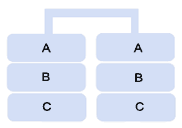
RAID 1 uses two drives and
makes an exact copy of the data on each drive without writing
any
parity data because none is needed. RAID 1 is
commonly referred to as "mirroring". The total capacity of the array is
the size of the largest of the two drives. RAID 1 tends to
read to the drives
quickly, but it writes to the drives slowly since it has to make
two copies of the data to each drive. However, RAID 1
provides 100% redundancy in the event one of the drives in the
RAID fails. A
RAID 1 can be created
with hardware or software. RAID 1 is frequently used in
many different
types of servers, external hard drives, NAS units, Snap Servers,
and in certain desktop computers.
As the need for fault tolerance increases, hard drive
manufacturers are using RAID 1 in many of
their devices to offer consumers the ability to protect their
data with mirroring.
For more
information about the devices using RAID 1 technology,
click here.
|
|
WHAT CAUSES RAID 1 FAILURE? |
|
There can be many reasons for RAID 1 failure.
Listed below are some of the most common:
 |
Bad Sectors in the RAID 1 |
 |
RAID 1 Backup Unsuccessful |
 |
RAID 1 Power
Failure |
 |
Corrupt Data in the RAID 1 |
 |
RAID 1 Broken |
 |
RAID 1 Power Surge |
 |
Corrupt Files in the RAID 1 |
 |
RAID 1 Controller Failure |
 |
RAID 1 Rebuild
Failure |
 |
Corrupt RAID 1 Controller |
 |
RAID 1 Crash |
 |
RAID 1 Won't
Boot |
 |
Damaged Files in the RAID 1 |
 |
RAID 1 Crashed |
 |
Reformatted
Drives in the Array |
 |
Deleted Files in a RAID 1 |
 |
RAID 1 Disk
Failure |
 |
Repartitioned
Drive in the Array |
 |
Failed RAID 1 |
 |
RAID 1 Drive
Failure |
 |
Server Crash |
 |
MFT
Corruption |
 |
RAID 1 Failure |
 |
Virus Attack
on the Array |
 |
Missing
Partitions |
 |
RAID 1
Firmware Failure |
 |
Virus
Corrupted the Array |
 |
Overwritten
Files |
 |
RAID 1 Partition
Table Corrupt |
 |
Virus Caused
RAID Failure |
|
|
WHAT
TO DO IF YOU EXPERIENCE A RAID 1 FAILURE |
|
If you
experience problems with your RAID 1 array, please do not attempt
to correct the problem
yourself. By taking matters into your own hands, you
could overwrite parity data making RAID
recovery more difficult. Please follow
the steps below and contact ReWave for assistance at
866-739-2835.
|
STEP 1 |
Turn off your RAID 1 device immediately.
This ensures that no additional data |
|
can be written to the array, which could overwrite the data
you are trying to recover. |
|
|
|
STEP 2 |
Document the series of events that occurred causing RAID
1 failure. It is important |
|
to make
notes if possible documenting any problems that occurred and the
efforts |
|
that were made to solve the problems. If you remove
the drives from the array, it is |
|
important to label the drives with the same order in which
they existed in the array. |
|
This will save our data recovery team a significant amount
of time when piecing the |
|
array back together to recover the data. |
|
|
|
STEP 3 |
Contact ReWave immediately. Our data recovery
team is available 24/7 to assist |
|
you with RAID recovery at 866-739-2835. |
|
|
|
|